The time on a walkthrough is part of the record. A fifteen-minute visit and a forty-minute formal observation are different things, and your analytics treat them differently. So when you come back to a draft, Education Walkthrough asks a simple question before the timer does anything: are you continuing the observation, or just finishing your notes?
Reopen a draft
- Open Walkthroughs. Drafts show an orange Finish button where completed walkthroughs show View. Use search or the filters if the list is long, see Navigating the Walkthroughs Page.
- Click Finish.

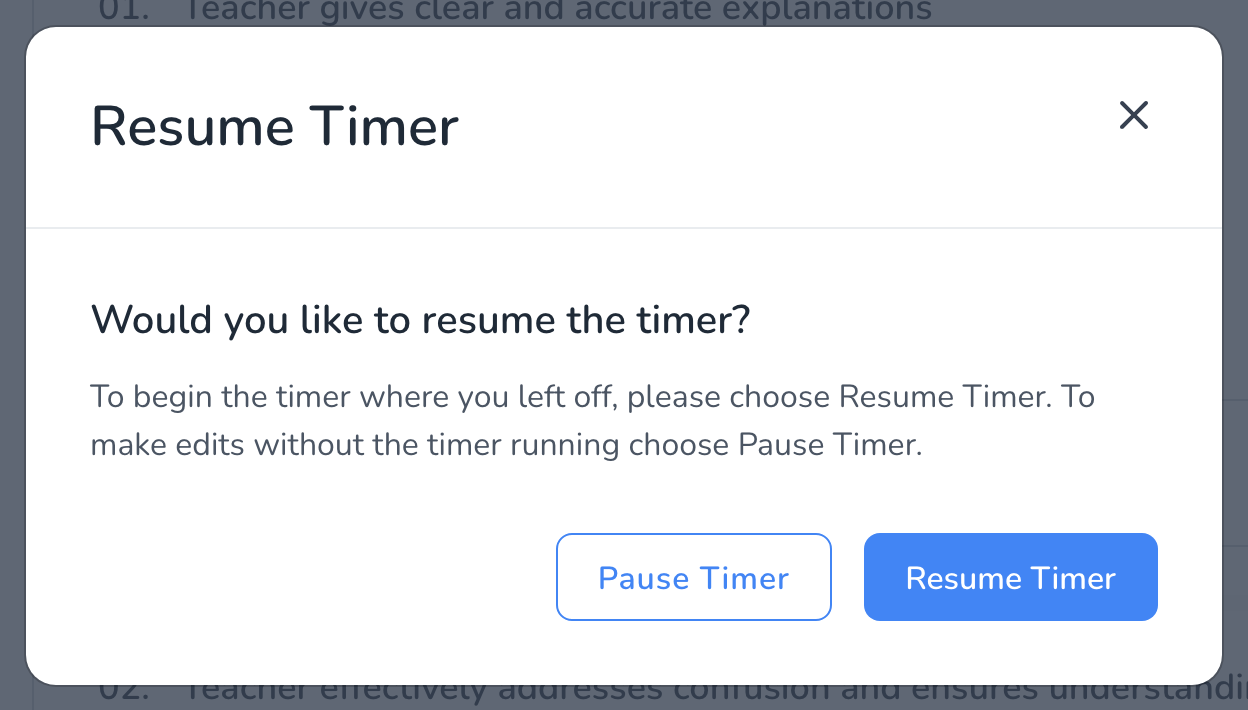
- Answer the prompt Would you like to resume the timer?
Which one to pick
- Resume Timer when you are still in the classroom. You stepped out for a minute, the screen locked, or you opened a second draft by mistake. The clock picks up where it stopped and the total reflects the real visit.
- Pause Timer when the visit is over and you are adding or polishing notes at your desk. Nothing is added to the observation time, so the record stays honest about how long you were in the room.
The timer never runs while a walkthrough sits as a draft, so a day between the visit and finishing the notes does not inflate the time.
Frequently asked questions
Q: I chose Resume Timer by mistake and left it running. Can I fix the time?
A: Yes, and you do not need to unsubmit. Submit the walkthrough, then on the Walkthroughs page click the walkthrough to open its expanded view, click Edit next to the date and duration, correct the end time, and Save, see How to Edit the Date and Time of a Walkthrough.
Q: Does the prompt appear on the mobile app?
A: Yes. The app asks the same question with the same two choices when you reopen a draft.
Q: My screen locked mid-walkthrough. Which should I choose?
A: Resume Timer, if you are continuing the observation. The draft kept everything you had entered, see What Happens If My Screen Locks During a Walkthrough.
Q: Can I pause the timer during a live walkthrough?
A: Not from the prompt, which only appears when you reopen a draft. If you need a break mid-visit, save the draft and reopen it with Resume Timer when you return.