
A curriculum director with eleven schools has a question no single principal can answer: is the new literacy framework actually showing up in classrooms, and where is it not? Eleven separate accounts with eleven slightly different checklists cannot tell her. District Premium puts every school under one roof, with one set of templates, one pool of licenses, and analytics that roll up to the district and drill down to any building.
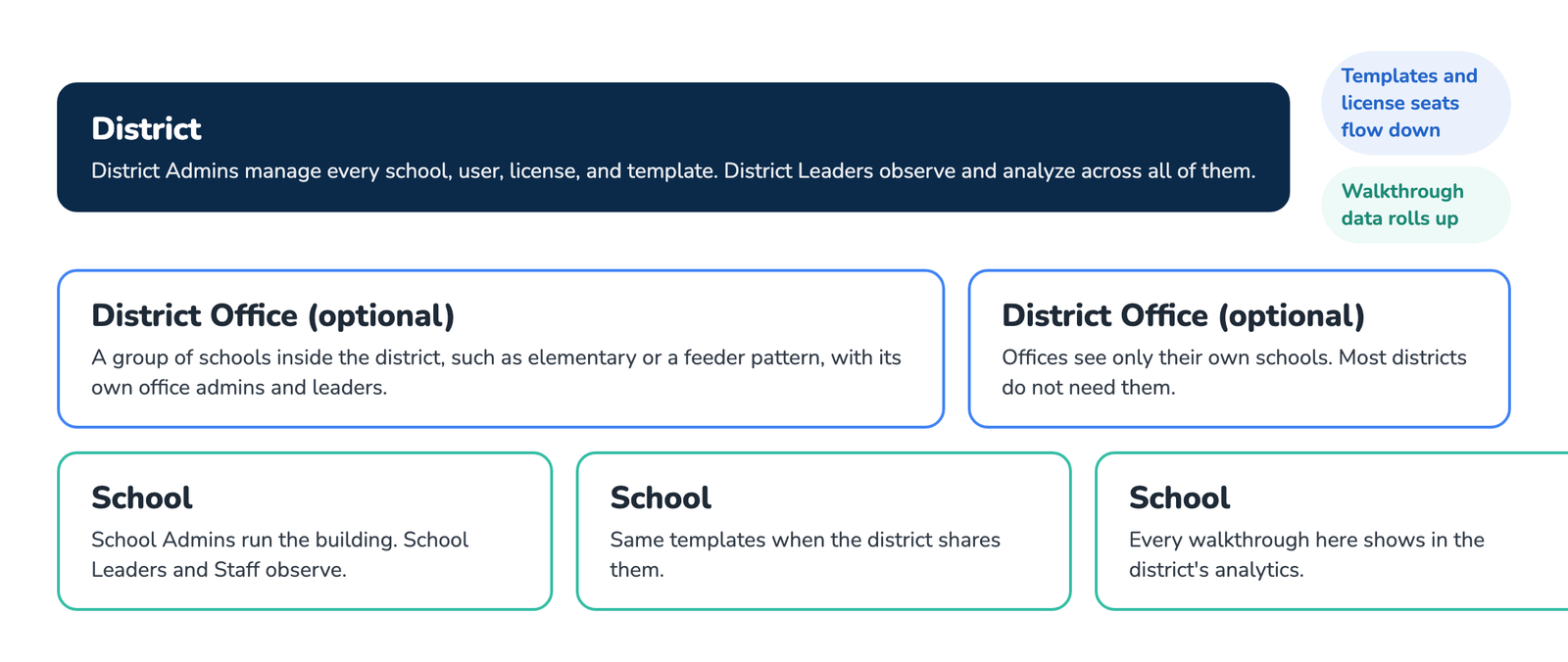
What the District Plan gives you
- Every school in one place. Switch between schools from the dropdown at the top of the dashboard, or choose All Schools to see users, teachers, walkthroughs, and templates for the whole district, see How to Switch Schools for District-Level Observations.
- District templates. Build a template once and share it to every school so each principal is looking for the same things. Lock template creation to the district if you want to keep it that way, see How to Lock Template Creation to the District.
- Analytics across schools. Compare schools side by side, then open any one of them to see the detail behind the number.
- One pool of licenses. Seats are bought for the district and assigned to people in any school. Moving a person between schools does not need a new seat, see How to Move Users and Teachers to Another School.
District roles
Four district-level roles sit above the school roles described in User Roles.
- District Admin. Runs the account: schools, users, licenses, templates, settings, and all analytics.
- District Leader. Observes and analyzes in any school in the district, without managing users or licenses.
- District Office Admin and District Office Leader. The same two roles scoped to a district office, a group of schools inside the district such as the elementary division. Most districts do not need offices.
Schools keep their own School Admins, School Leaders, and School Staff. A District Admin can do anything a School Admin can, in any school.
Who the District Plan is for
- Districts with more than one school that want consistent walkthroughs across buildings.
- Central office teams, curriculum directors, and instructional coaches who work in several schools.
- Any district that would rather buy one pool of seats than a separate plan per school.
One building is the School Plan. A cooperative or network that sits above several districts is the Region Plan.
Frequently asked questions
Q: How is the District Plan priced?
A: District Premium is priced per license with volume discounts as the seat count grows. Current prices are on the pricing page. Every observer needs their own seat; a seat is one person.
Q: Can we start with two schools and add the rest later?
A: Yes. Add schools and seats whenever you are ready. The district account grows with you.
Q: Do District Admins see individual teachers?
A: Yes. District roles see the same teacher names and walkthrough detail a School Admin sees, for every school in the district.
Q: We already have a School Plan at one building. Can it join the district?
A: Yes. The existing school account is connected to the district without re-creating anything. Contact us to set it up.
Q: How do we get people in?
A: Invite them by email with the role and school they belong to, see How to Invite Multiple Users.