A cooperative serving twenty districts has a problem a single district never has. The instructional team wants one walkthrough rubric used everywhere, the executive director wants to see trends across the whole service area, and each member district still wants to run its own schools and own its own data. Region Premium is the Education Walkthrough tier built for that shape: educational service agencies, cooperatives, Educational Service Centers, charter networks, and anyone else who sits above more than one district.
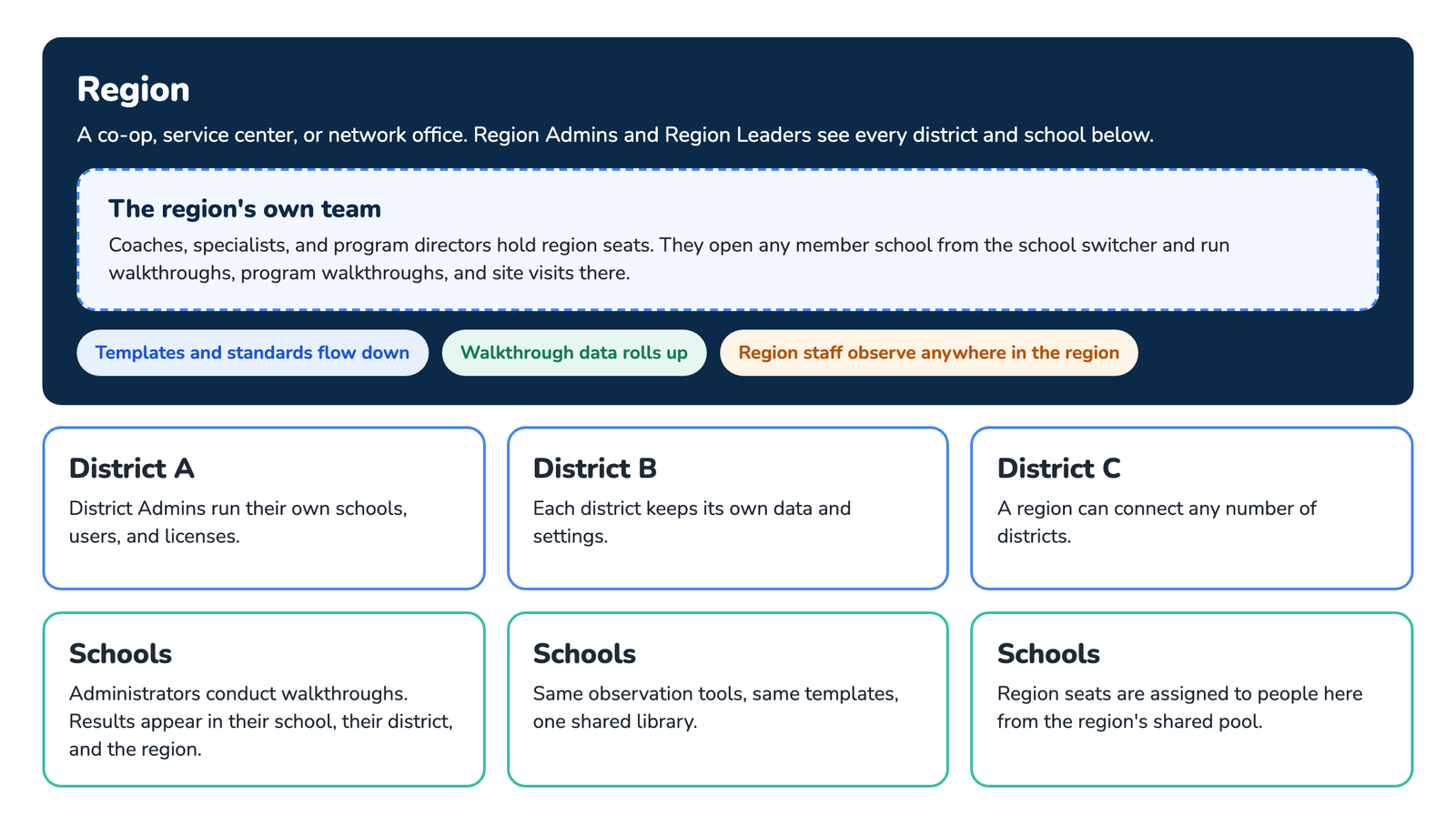
It works like the District Plan, one level up. A region connects districts the way a district connects schools.
What the Region Plan gives you
- One view across every district and school. Region users switch between schools from the same dropdown district users have, across the whole region, and see users, teachers, walkthroughs, and templates for all of them.
- Shared templates. Build a walkthrough template or rubric once at the region level and share it so every connected district and school uses the same instrument. See How to Share Templates.
- Analytics rolled up. Analyze results by school, district, or the entire region, for grant reporting, program evaluation, and instructional planning.
- A shared pool of licenses. Region seats are bought once for the region and assigned to people in any member district, so a cooperative can cover a small district that would never buy on its own.
Region user roles
Two roles work at the region level. They mirror the district roles described in User Roles.
- Region Admin. Manages the region: districts, users, licenses, and templates, with full access to every school’s data and analytics.
- Region Leader. The instructional leadership seat. Conducts walkthroughs anywhere in the region and works with analytics and templates, without managing users or licenses.
Districts inside a region keep their own District Admins and School Admins. Nothing about how a member district runs day to day changes when it joins a region.
Your own team in the field
A region is not only a reporting layer. Cooperative staff, instructional specialists, coaches, program directors, hold seats in the region account and do their own observing. From the school switcher they open any member school and run a walkthrough on that school’s roster, or a program walkthrough or site visit that is about the building rather than one teacher, see Observation Types. Those observations are filed with the school and roll up to the region, so a specialist’s visits to twelve buildings show up in the same analytics as the principals’ own walkthroughs.
- Use the region’s templates so a cooperative-wide initiative is scored the same way in every district.
- Site visits and program walkthroughs use the templates built for those observation types, with no teacher attached.
- Member districts see what was done in their buildings. A District Admin sees the specialist’s walkthroughs on their own schools; they do not see the other districts’ data.
Who the Region Plan is for
- Education service cooperatives and regional service centers that provide instructional support to member districts.
- Charter and private school networks with schools in more than one district.
- State or county programs that need one rubric and one data set across many districts.
If you oversee one district with many schools, the District Plan is the right fit. A single building is the School Plan.
Frequently asked questions
Q: How is the Region Plan priced?
A: Region Premium is priced by volume for the whole region rather than per school. Contact us through the pricing page and we will scope it with you.
Q: Can a district join a region later?
A: Yes. An existing district account can be connected to a region without re-creating anything. Ask support to map it.
Q: Do member districts see each other’s data?
A: No. A District Admin sees their own district. Only region roles see across districts.
Q: Can region users see individual teachers?
A: Yes. Region Admins and Region Leaders see the same teacher names and walkthrough details a District Admin sees, for every school in the region. If your cooperative has agreements that limit who may see teacher-level data, set that at the role level by giving those people a district role instead of a region role.
Q: Can a region share a template without letting schools edit it?
A: A shared template is used as-is by the schools it is shared with. Schools build their own templates separately, so the region’s instrument stays consistent.