
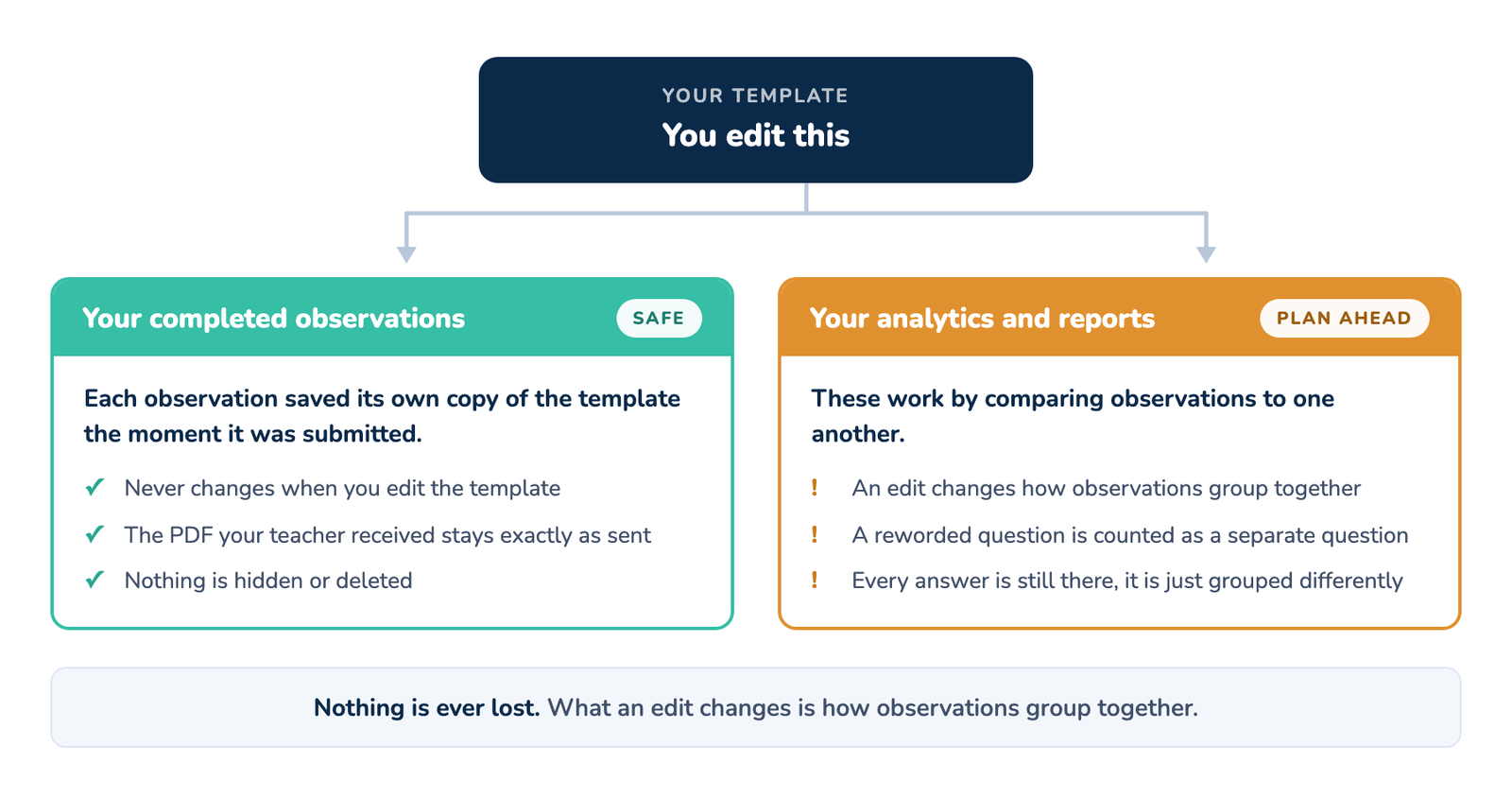
You built a template in August, your team ran fifty walkthroughs with it, and now you want to fix a typo, reword a look-for, or add a section for the new instructional focus. The first question every administrator asks is whether the observations already in the system are at risk. They are not. Editing a template never changes, hides, or deletes an observation that has already been completed.
What an edit does affect is how observations line up with each other in your analytics and reports over the course of the year. That part is worth understanding before you make a change, and it is what most of this article covers.
Your completed observations are safe, always
Every completed walkthrough saves its own copy of the template exactly as it looked the moment it was submitted, together with the answers, comments, and photos. A completed observation never goes back and re-reads the live template. So when you edit a template:
- Observations already completed keep the wording, options, and scores they were completed with.
- The PDF that was emailed to a teacher does not change. It was created when the walkthrough was submitted and it stays exactly as the teacher received it.
- Nothing disappears from your Walkthroughs list, and nothing disappears from an individual report.
This is true no matter how large the edit is. You can reword every question in a template and not one completed observation will change.
Edit in place to keep your year together, duplicate to start fresh
When you want to change a template that is already in use, you have two options and they do very different things. You can open that template and edit it, or you can duplicate it and edit the copy. Which one is right depends on a single question, do you want this year’s observations to stay together as one set?
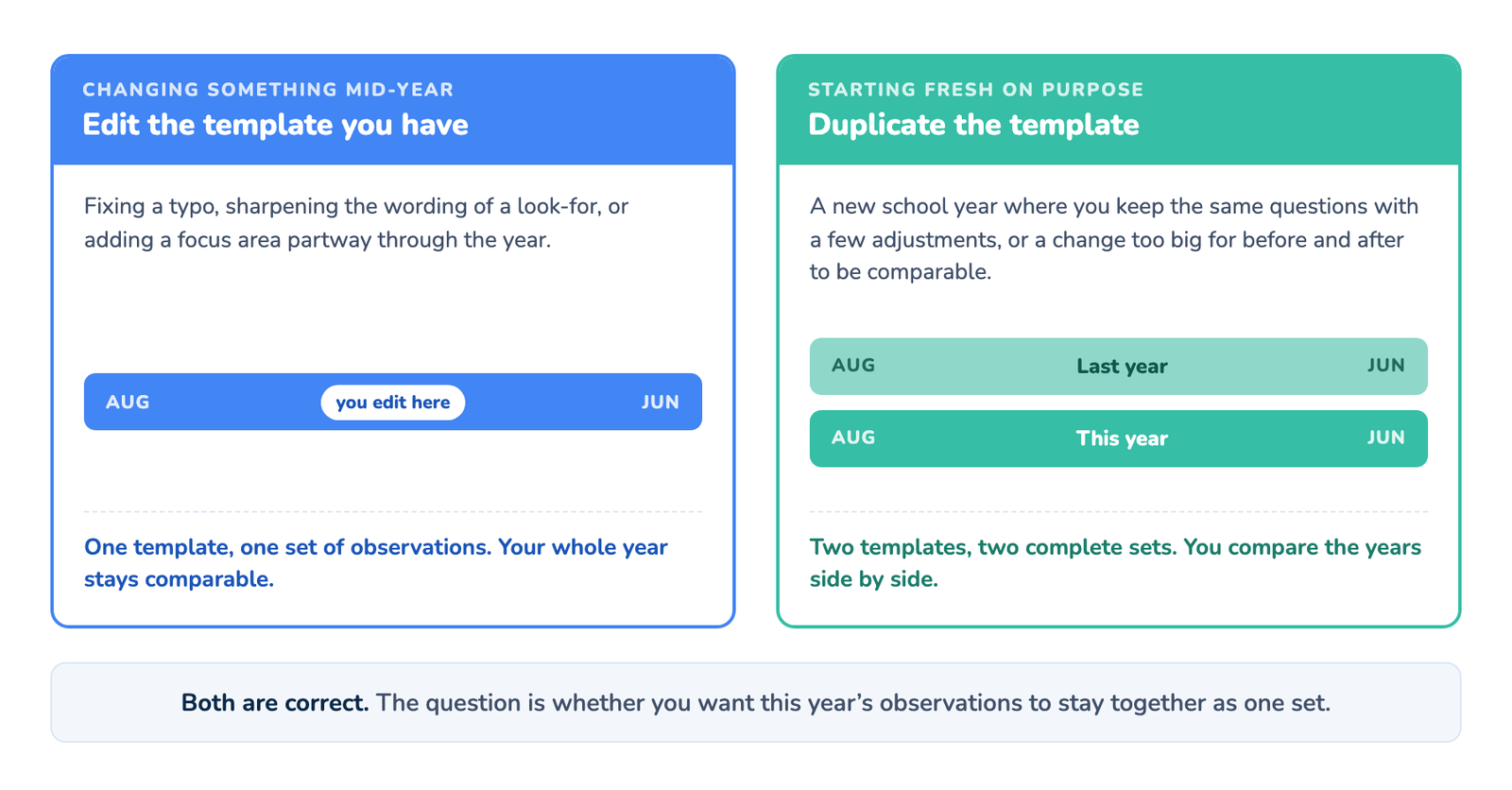
Editing in place keeps everything connected. Every observation, the ones completed before your change and the ones completed after, stays under the same template and is analyzed as one group. This is what you want for almost any mid-year change, whether that is fixing a typo, sharpening the wording of a look-for, or adding a focus area.
Duplicating starts a clean slate. A copy is a brand new template, even when every question inside it is identical. Your earlier observations stay attached to the original, so your analytics and reports split in two, everything before the copy under one template and everything after it under another. Nothing is lost, but the two sets are read separately from then on.
That split is a headache in the middle of a year and exactly what you want at the end of one. Duplicate on purpose when:
- It is a new school year and you want to carry the same questions forward with a few adjustments. Last year stays intact as its own complete set, this year starts clean, and you can compare the two years side by side instead of blending them into one running average.
- You are changing so much that comparing before and after would be misleading anyway. If half the questions are new, a single trend line across the change is telling you something untrue.
- A different school or team needs their own version to evolve in their own direction.
The mistake to avoid is duplicating mid-year to make a small change. That hands you a clean break you did not want, and two half-years you now have to read side by side for no reason. Small change during the year, edit in place. Fresh start at a natural boundary, duplicate.
Four things to finalize before you roll out your template
Your analytics and reports compare observations to one another, and they do that by looking at the words you chose and the order you put them in. Four things carry that meaning, so finalize them before the template goes out to a whole building or district. They are listed here in the order you meet them in a template, starting with the wording of a question and working down to the weights on each option.
| Decide this first | Why it matters | What happens to your data if you change this after observations have started |
| Question wording | Your analytics and reports group answers by the exact wording of the question. | Nothing is lost. The reworded question is treated as a separate question, so the answers collected before and after the change no longer combine. Even fixing a typo does this. |
| Option labels | Your analytics and reports recognize an answer option by its exact label. | Nothing is lost from your observations, but answers recorded under the old label stop counting toward that option in the tallies. |
| Option order | If you have not assigned weights, your options are scored from the top down, with the first option worth the most. | Nothing is lost, but your scores shift. The same answer can be worth a different number of points before and after the change, so a score can rise or fall when nothing in classrooms actually changed. |
| Weights | If you assign weights to your options, those numbers are what each answer is worth when observations are scored. | Nothing is lost, but your scores shift. Observations completed after the change are scored using the new numbers, and earlier ones keep the numbers they were completed with. |
None of this deletes anything. It changes how the data lines up. The simplest way to avoid surprises is a short trial run, five to ten walkthroughs with two or three observers, before the template goes out to everyone. Fix the wording and the option order while the data set is small.
What you can change at any time
These do not affect how observations are matched, so you can change them mid-year without thinking twice:
- Report formatting and layout
- The template name and description
- Your section names
- Sharing settings, including who the template is shared with
- The comment, photo, and video toggles on your questions
Adding a new question or section mid-year
If a new priority shows up in November, you can add a question, or a whole new section, at any time. Nothing already collected is affected and your observers will see it on their next walkthrough.
There is one thing to know about the number it produces. A newly added question is averaged across every observation on that template, including the ones completed before the question existed. So it reads lower than the answers it actually received, and it stays low until the rest of the year catches up. Adding a whole new section works the same way.
What to do about it depends on what you need. If observers simply need to start capturing the new focus area right away, add it and read how often each answer was chosen rather than the average, which stays accurate. If the average itself matters to you, add the new content on a duplicate of the template at the start of a new year or semester instead, so the new questions begin with a clean slate.
If you do reword a question
Nothing is lost. The old wording and the new wording both appear in your analytics and reports, each holding the answers collected under it, listed as two separate questions. Every observation is still there and still complete. Because each one is now counted on its own, both will read lower than the single combined question did.
If you want them back together, change the wording back to exactly what it was, word for word and character for character, and they line up again. Otherwise plan to read the two side by side for the rest of the year, and make wording changes at the start of the next school year instead. Renaming a section is different and is completely safe, so you do not need to worry about those.
FAQs
Q: Will editing a template change a PDF a teacher already received?
No. The PDF is created when the walkthrough is submitted and it does not change afterward.
Q: Can I delete a question from a template that is already in use?
Yes. It stops appearing on new walkthroughs, and every observation already completed keeps the answer it recorded. The only thing that stops is that question’s history, which no longer grows from that point.
Q: I want to change a question from one type to another, for example from a single choice to checkboxes. Can I?
The question type is locked once a question is created, so this means deleting the question and adding a new one in its place. As far as your analytics and reports are concerned that is a new question, so its history starts fresh, and the answers on your completed observations stay where they are. If year over year comparison matters to you, make this change at the start of a school year.
Q: We already duplicated a template and now have data under both. Did we lose anything?
No. Both sets are complete, they are just analyzed and reported separately, one under each template. If the split was intentional, for example a new school year, that is working exactly as it should. If it was not, pick the one you want to carry forward and edit that one in place from now on. Open a support ticket if you would like help deciding which one to carry forward.
Q: Does renaming the template affect my analytics and reports?
No. The template name, the description, your section names, the sharing settings, and the report layout are all safe to change at any time.
Related articles
- Using the New Template Builder
- How to Assign Weights to Template Question Options
- Rearrange Questions on a Template
- Analyze Data: Results Tab vs. Crosstable Tab
- How to Use Analytics in Education Walkthrough
New to walkthroughs in general? Start with educationwalkthrough.com.