The District Plan is the central hub for Superintendents, Assistant Superintendents, Curriculum Directors, and Central Office staff. This plan provides a unified view of instructional trends across all schools within your jurisdiction.
While School Plans focus on individual campus data, the District Plan allows you to standardize walkthrough templates across all schools, ensuring consistent language and measurement of instructional goals district-wide.
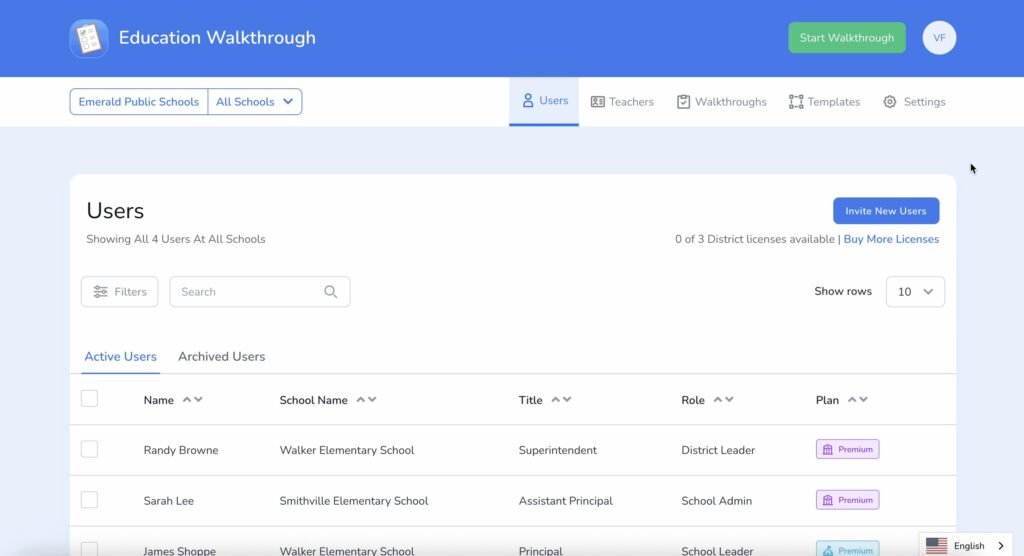
Key Features
- Centralized Template Management: Create a “Master Template” at the district level and share it with all schools. This guarantees that every principal and observer is looking for the exact same instructional indicators.
- School-to-School Comparison: View aggregated data to compare engagement levels, objective alignment, and instructional patterns between different schools.
- Advanced User Management: Easily manage users and licenses across different campuses from a single dashboard.
- Deep-Dive Analytics: Unlike the Region Plan (which anonymizes teacher data), District Admins generally retain the ability to drill down into specific school data to support Principals with evidence-based coaching.
District User Roles
The District Plan offers distinct permission levels to manage access to sensitive data:
| Role | Description |
| District Admin | Full Administrative Control. Can create and edit templates, manage all district and school-level users, and view all data (including specific walkthroughs and reports). |
| District Leader | Instructional Oversight. Designed for curriculum coaches or assistant superintendents who need to view reports and insights to guide professional development, without managing billing or user accounts. |
| District User | View-Only Access. typically used for board members or specific stakeholders who need visibility into district-wide trends but do not perform walkthroughs or edit settings. |
Note: District Users default to seeing “All Schools” on the web dashboard, ensuring a comprehensive view immediately upon logging in.
Visualizing the Hierarchy
The District Plan sits in the middle of the Education Walkthrough ecosystem, bridging the gap between high-level goals and classroom execution:
- District (You are Here): Sets Goals, Standardizes Templates & Monitors Implementation.
- Schools: Principals & VPs Conduct Walkthroughs using District Standards.
Teachers: Receive Consistent, High-Quality Feedback.
Frequently Asked Questions (FAQs)
Who is the primary audience for the District Plan?
The District Plan is the central hub for Superintendents, Assistant Superintendents, Curriculum Directors, and Central Office staff.
Can I compare instructional performance between different schools in the district?
Yes. A key feature is being able to view Walkthrough Analytics at the District level (by selecting the School name from your School dropdown menu > Walkthroughs > Data Analytics), which allows you to view aggregated data to compare engagement levels, objective alignment, and instructional patterns between campuses.
Does the District Plan allow me to see individual teacher data?
Generally, yes. Unlike the high-level Region Plan, District Admins typically retain the ability to drill down into specific school and walkthrough data to support Principals with evidence-based coaching.
What are the three main user roles within the District Plan?
The three distinct roles, which determine access to sensitive data, are: District User: View-Only Access, ideal for stakeholders like board members who need visibility into district-wide trends; District Admin: Full control, including template creation, user management, and viewing all data; District Leader: Focuses on Instructional Oversight (reports and insights) to guide professional development.
For more help or additional support, please visit our support page.