
Inviting your team is the quickest way to get everyone into Education Walkthrough. You can paste a list of email addresses or upload a spreadsheet, and the invitations go out for you.
Most administrators do this once at the start of the year, then add people one at a time as staff change.
How to invite multiple users
- Log in and click Users.
- Click Invite Users.
- Choose how you want to add them, either Copy and paste a list of users or Import with CSV. If you are using a spreadsheet, click Download CSV Template first so your columns match.
- Click Continue and follow the remaining steps to review the list, set roles, and send.
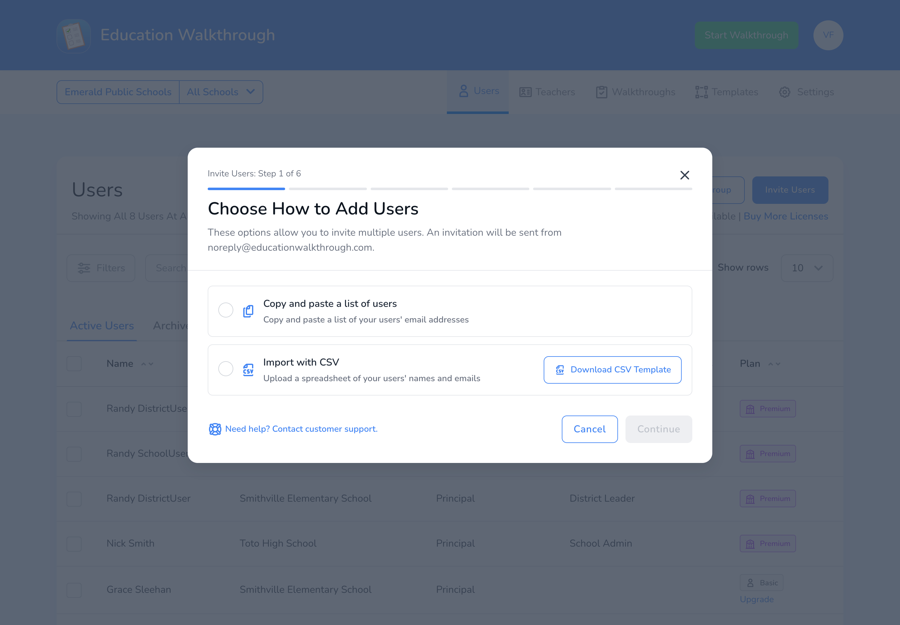
Invitations are sent from noreply@educationwalkthrough.com. It is worth telling your team to expect it, so it does not sit in a spam folder.
Choosing roles
The invite flow walks you through assigning a role as part of sending the invitations, so you do not have to go back and set them afterwards. If you are not sure which role someone needs, see User Roles.
Managing invitations after you send them
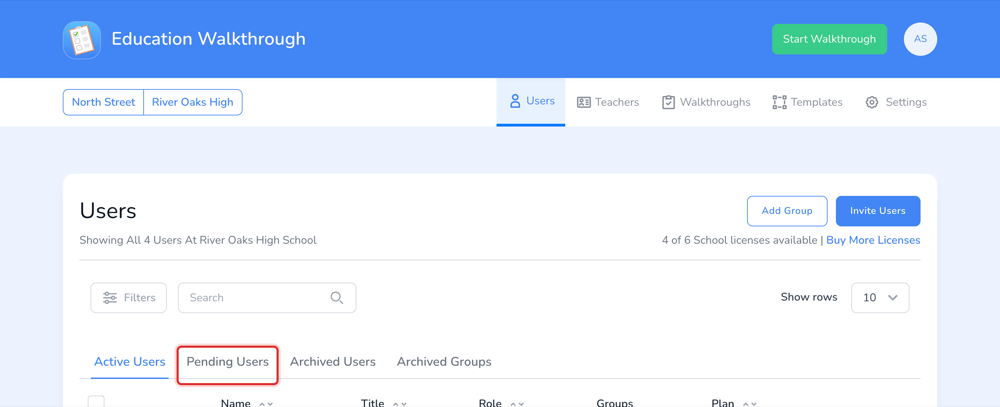
Open the Pending Users tab to see who has not accepted yet. From there you can resend or withdraw invitations, including in bulk.
Frequently asked questions
What happens if I invite someone who already has an account?
The review step flags them as a duplicate and no second invite is sent.
What if someone does not get their invite?
Ask them to check their spam folder first. If it is still missing, resend it from the Pending Users tab.
Can I invite people with different roles at once?
Yes. Roles are part of the invite flow, so a single batch can contain different roles.
Can I add users from a spreadsheet?
Yes. Choose Import with CSV and start from the Download CSV Template so your columns line up.