A look-for scored Accomplished, Proficient, Developing, Ineffective is a scale, not four unrelated labels. Weights tell Education Walkthrough how far apart those labels are, so a school’s average on a question means something and a chart of growth over the semester shows growth rather than a count of words. Set them once on the template’s default options and every multiple choice question starts with them; give a question its own options and it carries its own weights.
Weights are not scores
A weight is not a grade for a teacher. Walkthroughs are non-evaluative: one visit is a snapshot, and the number behind an option exists so that many snapshots can be added up. Weights aggregate across walkthroughs, teachers, and schools to show where instruction is trending, and that aggregate is what leadership reads. No teacher sees a weight, and no single walkthrough’s weights should be read as a rating of the person observed.
Set the options and their weights
- Open Templates and click Edit on the template.
- Click the Settings tab in the builder and scroll to Default Options: Multiple Choice.
- Edit the option labels and type a Weight for each one. Higher means stronger. A weight of 0 keeps the option out of averages, which is what you want for Not Observed.
- Click Add Option for a fifth or sixth level, or the X to remove one. Clear Options starts over.
- Click Save.
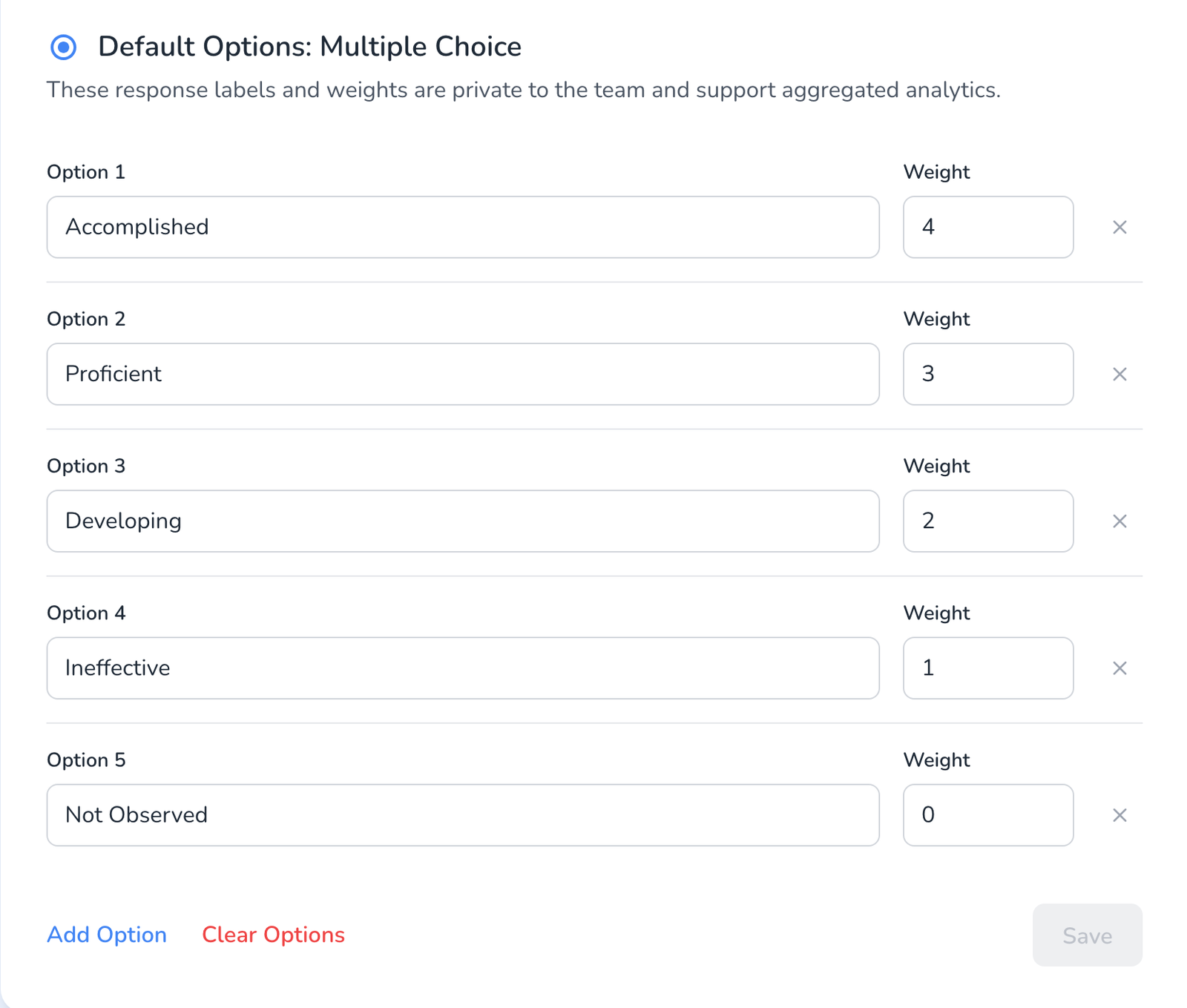
Every multiple choice question you add to this template starts with these default options and weights, so set them before you build the questions and they are right everywhere. If a question needs a different scale, replace its options on the Build tab; a question with custom options has its own labels and its own weights, independent of the defaults.
How weights show up
- Averages. Analyze Data uses the weights to compute a question’s average and a school’s trend over time, see How to View Walkthrough Results.
- Counts and percentages do not change. A pie chart of how often each option was chosen looks the same with or without weights.
- Reports to teachers show the option label, never the number.
Frequently asked questions
Q: Can different questions in the same template have different weights?
A: Yes. Questions that use the template’s default options share the same option text and weights. Give a question its own options and that question’s labels and weights are fully custom. Mixing is fine: most look-fors on the default scale, one or two on their own.
Q: Do I need weights at all?
A: Only if you want averages and growth lines. A template with no weights still charts counts and percentages.
Q: I changed the weights after walkthroughs were completed. What happens?
A: Analytics recalculate with the new weights. The observations themselves do not change, see What Happens to Your Data When You Edit a Template After Observations.
Q: Does the template need republishing?
A: Yes, if it is already published, click Publish after saving so observers get the updated options, see How to Publish a Template.